Upload Metadata Scrubber by Hexloom Labs

Remove author and revision data from the files your site receives

A free WordPress plugin. When a PDF, Word, Excel, PowerPoint or image file is uploaded, it blanks the author, last-saved-by, company and revision fields, then shows you what it removed and what it could not.

Status: version 0.1.0 is finished and waiting for listing in the WordPress.org plugin directory. Once listed, search for “Upload Metadata Scrubber” under Plugins > Add New. This page will link to it.

contract-draft.docx Properties > Details, as a visitor sees it after downloading
FieldAs uploadedAfter the plugin
AuthorJane DoeRemoved
Last saved byM. OrtizRemoved
CompanyAcme Legal LLPRemoved
Revision number14Removed
Date created3 Mar 20263 Mar 2026 (left in place)

Example values. Dates stay in the file, and the plugin’s report says so for every file.

What it cleans, and what it leaves alone

It works on your own server when a file reaches the Media Library, and it never changes a file if it cannot do so safely. Here is the short version; the limits page has the detail.

Word, Excel and PowerPoint

Removed

Author, last saved by, title, subject, keywords, revision number, last printed date, editing time, company, manager, custom properties and the preview thumbnail.

Left in place

Text in the document itself, tracked changes, comments, headers and footers, embedded photos, and created and modified dates. The report lists them when found.

PDF

Removed

Author, title, subject, keywords, creator, producer and XMP details, where the structure of the file allows a safe change.

Left in place

Dates and the document ID. Digitally signed PDFs, and PDFs that keep their document information in a compressed block, are reported but not changed.

JPEG, PNG and WebP images

Removed

Camera and date taken, GPS location, XMP and text chunks, without re-compressing the picture.

Left in place

Orientation and colour profile, so images still look right.

A report for every file, in the Media Library

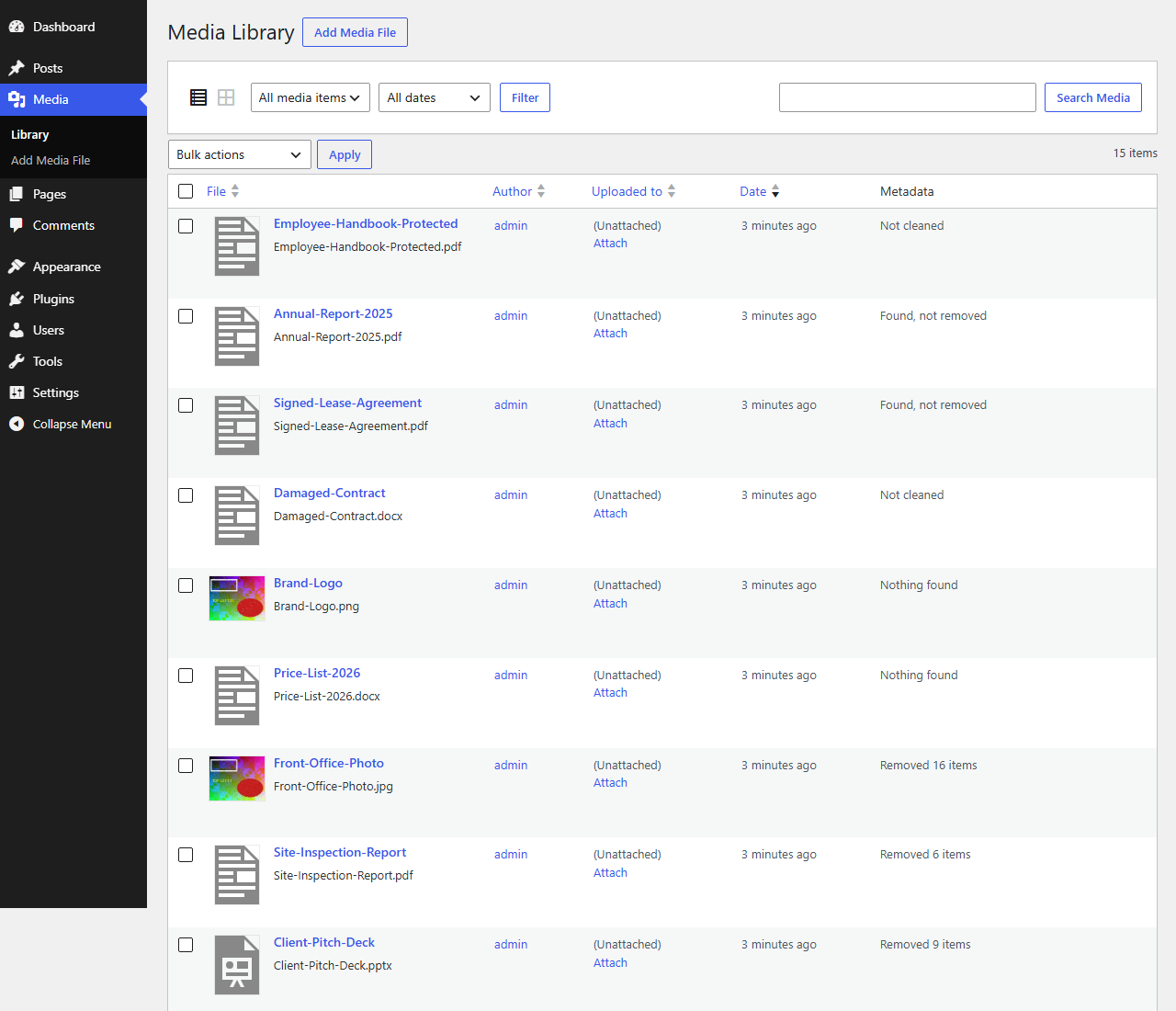
The Media Library list gets a Metadata column that says whether each file was cleaned, had data found but not removed, or had nothing to find. Open a file to see the full list.

By default the report records the kind of data removed (for example “Author”), not the value, so names are not copied into your database. You can switch values on in the settings.

Files that cannot be cleaned safely are left exactly as uploaded, with the reason written next to them.

The WordPress Media Library list with a Metadata column. Files are marked Removed 16 items, Found, not removed, Nothing found, or Not cleaned.
The Media Library list with the Metadata column.
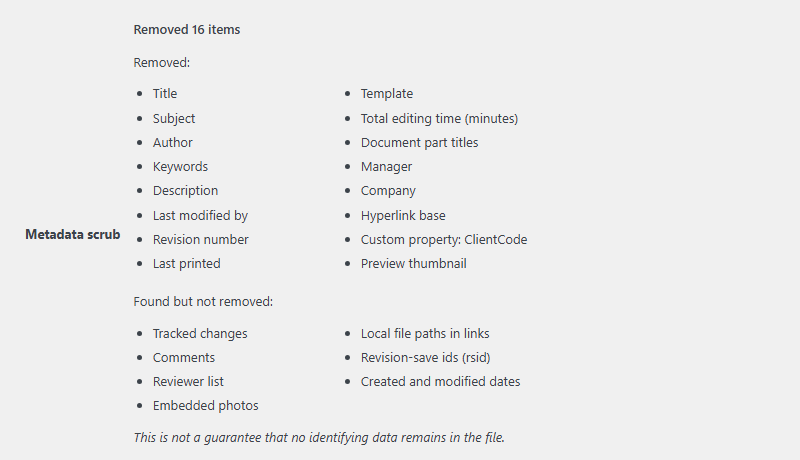
The Metadata scrub report for a Word file: sixteen items removed, then a second list of items found but not removed, including tracked changes, comments and embedded photos.
The report for a Word file: what was removed, then what was found and left.
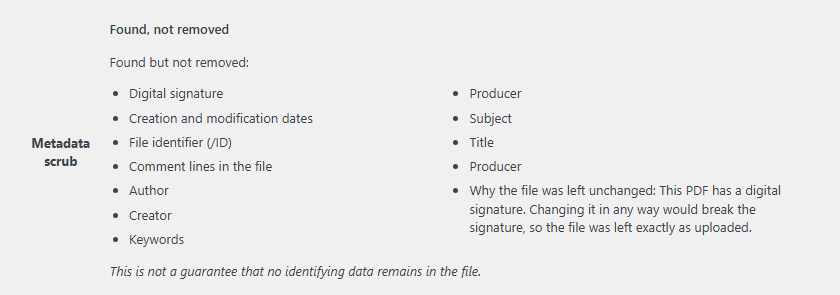
The report for a digitally signed PDF: the file was left unchanged because editing it would break the signature, and the fields found are listed.
A signed PDF is reported, not changed, so its signature stays valid.

Who it is for

Sites where people other than you upload or publish files that visitors can download: agencies, law and accounting firms, real-estate sites, nonprofits, membership sites and photographers. A Word contract or a price list carries the name of whoever saved it last, and anyone can read that by opening the file’s properties.

Pro add-on: planned, not on sale yet

The free plugin only cleans new uploads. A separate Pro add-on is planned for sites that need more:

  • Clean the files already in your Media Library in bulk.
  • Export a CSV audit log of what was removed from each file.
  • Cover uploads from WooCommerce and form plugins.

Planned price: $29 a year per site. It will be a separate download, never part of the free plugin, and nothing on this page can be bought yet.

Get one email when it is listed on WordPress.org

The plugin is built and tested but is not in the WordPress.org directory yet. Leave your address and you get a single email the day it is listed, and nothing else. You confirm by link first, and every email has an unsubscribe link. Privacy.

Questions

Does it remove all metadata?

No, and no tool can promise that. It removes the standard author and revision fields listed above and tells you what else it found. Names typed into the body of a document, tracked changes and comments are not removed. It is not a guarantee, and it is not legal or compliance advice.

Does it change files already in my Media Library?

No. Only new uploads are processed. Cleaning the existing library is what the planned Pro add-on is for.

Can it damage a file?

The plugin writes a new copy, checks that it opens, and only then replaces the upload. If anything looks wrong, the file stays exactly as uploaded and the report says why. Images are not re-compressed.

Does it send my files anywhere?

No. Everything runs on your server, and the plugin makes no requests to any other service.

What does it need?

WordPress 5.8 or later and PHP 7.4 or later. Word, Excel and PowerPoint files need the PHP Zip extension, which most hosts provide; without it those files are left untouched and the report says so. It is licensed GPLv2 or later.

Does it work with WooCommerce and form uploads?

It cleans files that go through the standard WordPress upload handling, which includes the Media Library and the block editor. A plugin that stores uploads its own way may bypass it. Dedicated coverage for those is part of the planned Pro add-on.